XIV Open Beta August 31st

XIV Open beta August 31st


I got the same problem and that was from SE and Krizz's site. However I had previously DL'ed past the red screen so I already had the folder created. You can try and create the folders yourself and see if that works?

Asura.Tristean said:
I got the same problem and that was from SE and Krizz's site. However I had previously DL'ed past the red screen so I already had the folder created. You can try and create the folders yourself and see if that works?
Any Idea how I would go about doing that other than making a folder with the name. Like whats inside it?


lol weaver's guild door isn't openning /sigh
/restarts ffxiv
/restarts ffxiv

Ramuh.Krizz said:
When the updater applies the patch it deleted the .patch file. Only the torrent remains.
See if this helps? I'm so confused as to what is wrong.
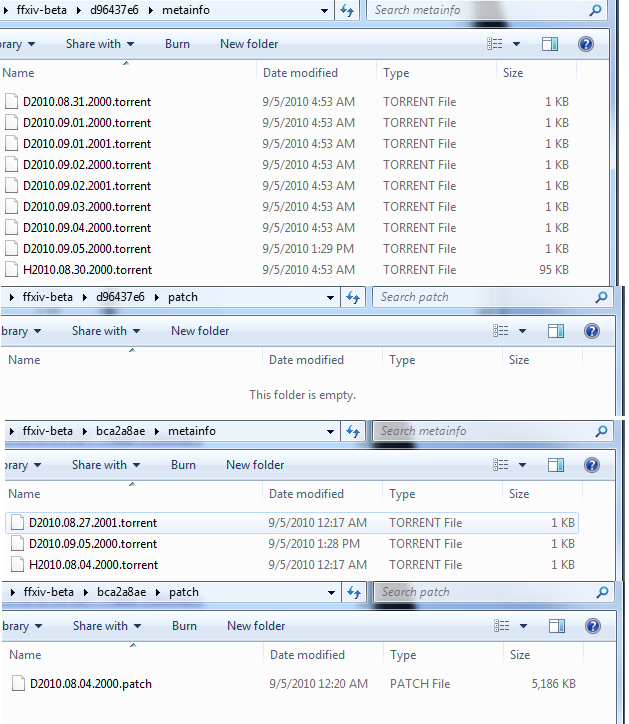
I have a feeling I'm missing something, but kinda new to this stuff and very new to windows 7 64...
edit: so I lined up all my files and the files on your downloads page, seems the only one not installed is D2010.08.04.2000.patch, which is in the patch folder, but the viewer doesn't do anything...


If you screw up in character creation, anyone know if you can use the same name if you delete the character? Or is that name "taken" forever?

Lakshmi.Galathea said:
Ramuh.Krizz said:
When the updater applies the patch it deleted the .patch file. Only the torrent remains.
See if this helps? I'm so confused as to what is wrong.
I have a feeling I'm missing something, but kinda new to this stuff and very new to windows 7 64...

Lakshmi.Jaerik said:
If you screw up in character creation, anyone know if you can use the same name if you delete the character? Or is that name "taken" forever?
Yeah you should be able to, I did the same thing. It's possible that you might have to wait a few minutes though.
Lakshmi.Jaerik said:
If you screw up in character creation, anyone know if you can use the same name if you delete the character? Or is that name "taken" forever?
Ramuh.Krizz said:
Lakshmi.Galathea said:
Ramuh.Krizz said:
When the updater applies the patch it deleted the .patch file. Only the torrent remains.
See if this helps? I'm so confused as to what is wrong.
I have a feeling I'm missing something, but kinda new to this stuff and very new to windows 7 64...
So that means my client is broken? If it just refreshes that login screen then I need to redo everything, or is there some file that I don't have?
Lakshmi.Galathea said:
Ramuh.Krizz said:
Lakshmi.Galathea said:
Ramuh.Krizz said:
When the updater applies the patch it deleted the .patch file. Only the torrent remains.
See if this helps? I'm so confused as to what is wrong.
I have a feeling I'm missing something, but kinda new to this stuff and very new to windows 7 64...
So that means my client is broken? If it just refreshes that login screen then I need to redo everything, or is there some file that I don't have?
Ramuh.Krizz said:
Check your internet explorer settings. For some reason those settings can effect it since FFXIV uses those settings. Adding the square-enix site to your trusted sites, and whatnot helps. I believe we already talked about that though.
I assume NO ONE else is having this problem of course =\
Lakshmi.Galathea said:
Ramuh.Krizz said:
Check your internet explorer settings. For some reason those settings can effect it since FFXIV uses those settings. Adding the square-enix site to your trusted sites, and whatnot helps. I believe we already talked about that though.
I assume NO ONE else is having this problem of course =\
Ramuh.Krizz said:
Lakshmi.Galathea said:
Ramuh.Krizz said:
Check your internet explorer settings. For some reason those settings can effect it since FFXIV uses those settings. Adding the square-enix site to your trusted sites, and whatnot helps. I believe we already talked about that though.
I assume NO ONE else is having this problem of course =\
I'm assuming I have latest Fox, just got the PC 2 days ago.
Also. The FFXIV client boot window (the blue one) says version 2010.09.05.2000
I'm in the process of redownloading all the files and prolly gonna try again tonight (If you are out of ideas)
Maybe I'm missing something obvious? I know my PC can handle it, maybe I'm missing software?


Lakshmi.Galathea said:
maybe I'm missing software?
Usual basic stuff maybe? .net framework 3.5 etc? Just a suggestion, go Google it.
Lakshmi.Galathea said:
Version: 8.0.7600.16385
I'm assuming I have latest Fox, just got the PC 2 days ago.
I don't think pre-built machines come with Firefox, go Google that too, Or get Google Chrome 'cause FireFox is pants.


So I heard Trabia server went down a while ago? Status says its only been up for just over a hour. I'd be on right now but I'm waiting to do Ovni. :\ I'll be on after if anyone is bored. XD
And yes Jaerik, if you mess up and delete it just wait a few minutes and you can use the same name again.
And yes Jaerik, if you mess up and delete it just wait a few minutes and you can use the same name again.
Asura.Meowzma said:
Lakshmi.Galathea said:
maybe I'm missing software?
Usual basic stuff maybe? .net framework 3.5 etc? Just a suggestion, go Google it.
Lakshmi.Galathea said:
Version: 8.0.7600.16385
I'm assuming I have latest Fox, just got the PC 2 days ago.
I don't think pre-built machines come with Firefox, go Google that too, Or get Google Chrome 'cause FireFox is pants.
I went to install the .NET framework and it says "You must use 'Turn Windows features on or off' in the control panel to install or configure Microsoft .NET Framework 3.5" ... Where is THAT located? (<- the thing they ask for, I know where control panel is LOL)

I think they fixed the issues with the slow download speeds with todays patch. I'm getting 900Kb/s-1.2Mb/s on my new laptop versus less than 3Kb/s on my desktop a week ago.
I had issues with the update stopping at 98.4% or so on the red update. Just copied the file from my desktop and it worked fine. Grab the file from tehkrizz website if you don't have access to an already updated file. (Krizz deserves some mad props for coming to everyones aid early on.)

I had issues with the update stopping at 98.4% or so on the red update. Just copied the file from my desktop and it worked fine. Grab the file from tehkrizz website if you don't have access to an already updated file. (Krizz deserves some mad props for coming to everyones aid early on.)
Lakshmi.Galathea said:
I went to install the .NET framework and it says "You must use 'Turn Windows features on or off' in the control panel to install or configure Microsoft .NET Framework 3.5" ... Where is THAT located? (<- the thing they ask for, I know where control panel is LOL)
Start
Control Panel
Uninstall a Program
(left hand side in the bar)
- Turn Windows feature on/off
Can we just have Krizz make a new topic under XIV titled Entrance to Beta or something, and have Jaerik sticky it? Paste your guide urls there as the the first post. I'll help with some problems too if I'm in the mood :p
Diabolos.Chupacabra said:
I think they fixed the issues with the slow download speeds with todays patch. I'm getting 900Kb/s-1.2Mb/s on my new laptop versus less than 3Kb/s on my desktop a week ago.
I had issues with the update stopping at 98.4% or so on the red update. Just copied the file from my desktop and it worked fine. Grab the file from tehkrizz website if you don't have access to an already updated file. (Krizz deserves some mad props for coming to everyones aid early on.)
I had issues with the update stopping at 98.4% or so on the red update. Just copied the file from my desktop and it worked fine. Grab the file from tehkrizz website if you don't have access to an already updated file. (Krizz deserves some mad props for coming to everyones aid early on.)
--
I am up with TeamViewer helping someone. If you are familiar with the program, or want to try it out, I'm game. This is primarily to fix the issue of the updater not seeing the files when they're in the right folder.
This program gives me control of your desktop so I can manipulate folders. I know this makes some people nervous, but I'm offering it as an option for those who want to.
Asura.Meowzma said:
Can we just have Krizz make a new topic under XIV titled Entrance to Beta or something, and have Jaerik sticky it? Paste your guide urls there as the the first post. I'll help with some problems too if I'm in the mood :p
Still going strong here Krizz. I risked stopping the download and restarting... Now I'm getting 1.1-1.6Mb/s.

I noticed my CPU usage dropped from like 90% to 10% while running the updated downloader as well. So seems they did tweak something in it.
I noticed my CPU usage dropped from like 90% to 10% while running the updated downloader as well. So seems they did tweak something in it.
Ramuh.Krizz said:
I am up with TeamViewer helping someone. If you are familiar with the program, or want to try it out, I'm game. This is primarily to fix the issue of the updater not seeing the files when they're in the right folder.
This program gives me control of your desktop so I can manipulate folders. I know this makes some people nervous, but I'm offering it as an option for those who want to.
This program gives me control of your desktop so I can manipulate folders. I know this makes some people nervous, but I'm offering it as an option for those who want to.
Asura.Meowzma said:
Lakshmi.Galathea said:
I went to install the .NET framework and it says "You must use 'Turn Windows features on or off' in the control panel to install or configure Microsoft .NET Framework 3.5" ... Where is THAT located? (<- the thing they ask for, I know where control panel is LOL)
Control Panel
Uninstall a Program
(left hand side in the bar)
- Turn Windows feature on/off
edit: FFXIV Viewer still just does a "refreshing" type thing in the windows.
Lakshmi.Galathea said:
Ramuh.Krizz said:
I am up with TeamViewer helping someone. If you are familiar with the program, or want to try it out, I'm game. This is primarily to fix the issue of the updater not seeing the files when they're in the right folder.
This program gives me control of your desktop so I can manipulate folders. I know this makes some people nervous, but I'm offering it as an option for those who want to.
This program gives me control of your desktop so I can manipulate folders. I know this makes some people nervous, but I'm offering it as an option for those who want to.
How much longer will that be?
Edit: Chupa, glad to hear it. I noticed that the updater prioritizes today's updates now.
If my 3rd shift come in on time, I should be home in an hour.

Cerberus.Boundsoul said:
Ramuh.Mairah said:
Cerberus.Boundsoul said:
mine only wants to download the one to the b folder, no data goes to the d one. i downloaded it off of krizz's site and now i get this

any ideas?
EDIT: thats with today's patch, dropped it in the right folder. client found it fine, but the smaller box there won't do anything. now whenever i try to boot FFXIV this is what i get.
any ideas?
EDIT: thats with today's patch, dropped it in the right folder. client found it fine, but the smaller box there won't do anything. now whenever i try to boot FFXIV this is what i get.
My friend downloaded off of Krizz's site and didn't get that folder either. Her thing won't even update. I'm not sure what it is.
yeah i've tried torrenting and krizz's, always end up with the error above. if i delete the patches and just let the client update itself, it stops at 94.6% even though the file size of the patch it downloads is complete.
k, well now it finishes to 100%, but gives me the same error as above like when i manually do it. anyone know how to fix it or also have this problem?
Lakshmi.Galathea said:
edit: FFXIV Viewer still just does a "refreshing" type thing in the windows.
I think it just constantly refreshes either way. However, you should still get more response when you click it.
Ramuh.Krizz said:
Asura.Meowzma said:
Can we just have Krizz make a new topic under XIV titled Entrance to Beta or something, and have Jaerik sticky it? Paste your guide urls there as the the first post. I'll help with some problems too if I'm in the mood :p
Was asking for more of a help desk thread tbh for those that are still struggling but never mind, guess this thread will do.

i got the patches required from the Krizz site... where do i add them to?
Asura.Meowzma said:
Ramuh.Krizz said:
Asura.Meowzma said:
Can we just have Krizz make a new topic under XIV titled Entrance to Beta or something, and have Jaerik sticky it? Paste your guide urls there as the the first post. I'll help with some problems too if I'm in the mood :p
Was asking for more of a help desk thread tbh for those that are still struggling but never mind, guess this thread will do.
Because people aren't even trying.
Carbuncle.Alessandra said:
i got the patches required from the Krizz site... where do i add them to?
There is a "FFXIV Installation Guide" link to the right of the Downloads link. Srsly.

All FFXI content and images © 2002-2026 SQUARE ENIX CO., LTD. FINAL
FANTASY is a registered trademark of Square Enix Co., Ltd.